Color by Number Worksheet Maker
Create color-by-number worksheets from your own images.
Upload line art or a colored drawing, adjust the key, then export a student worksheet and answer key.
If you have ever made a color-by-number worksheet by hand, you know the annoying part is not the idea. It is the little setup work: tracing the picture, making the color key, placing the numbers, duplicating everything for the answer key, and checking it again.
I made Color by Number Worksheet Maker as a small tool to help with that setup. You can still adjust the colors, labels, and individual regions before you export.
Try it in your browser
Try your own image in the demo and see if it gives you a worksheet you can use.
Try the DemoBuy License - $49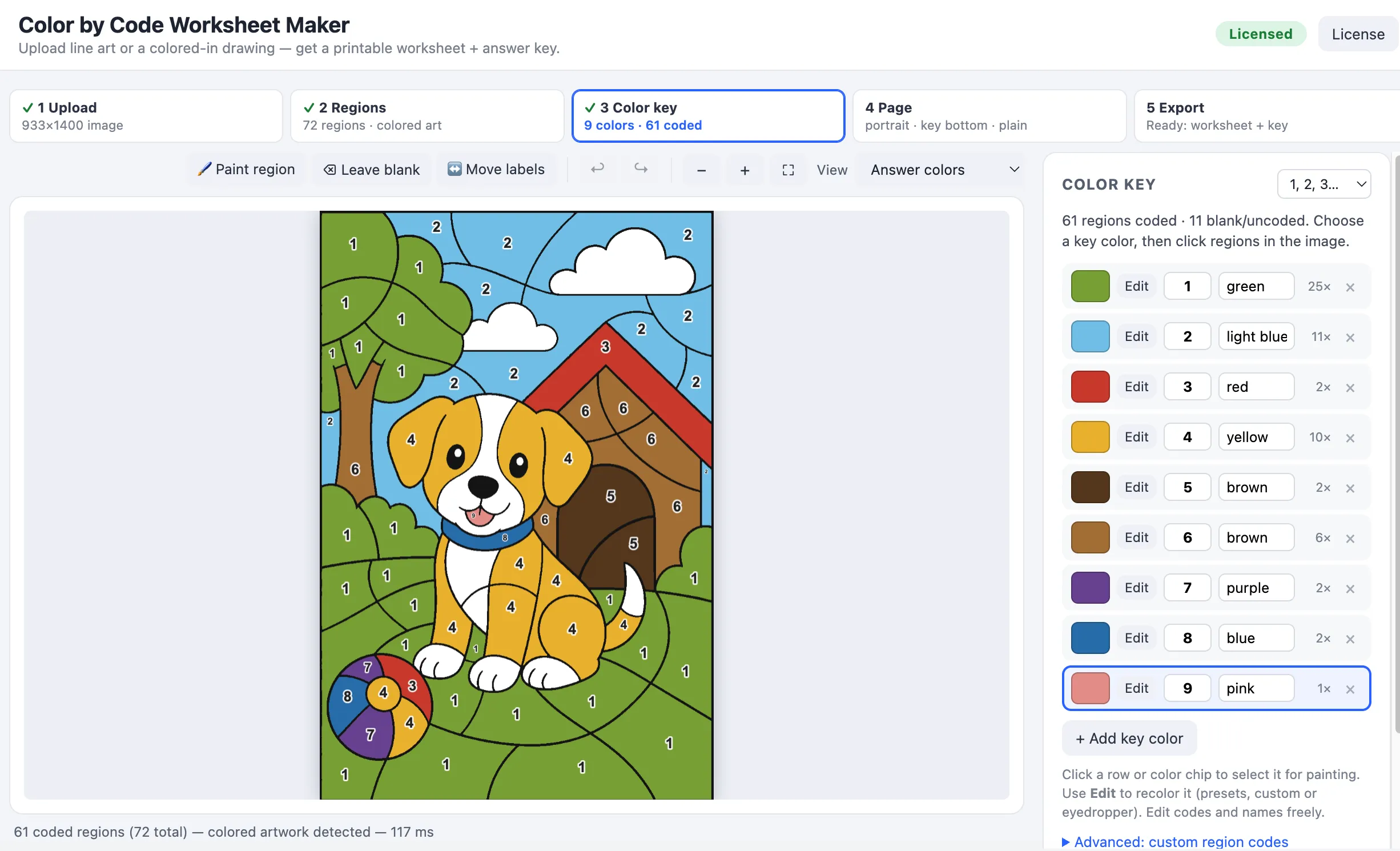
Want to see it in action first? I wrote a step by step walkthrough that takes a piece of dinosaur line art all the way to a printed worksheet and answer key.
Good for
- Seasonal printables
- Early finisher pages
- Sub plans
- Morning work
- Simple TPT worksheet packs
Features
- Upload PNG or JPG line art and find the colorable regions
- Detect colored artwork and build a matching color key from the picture
- Use numbers or letters for the worksheet codes
- Change colors, code labels, and color names in the key
- Click regions to repaint them, leave them blank, or move labels by hand
- Repair small gaps in outlines so shapes do not leak into each other
- Preview the student worksheet and answer key before exporting
- Export worksheet PNG, answer key PNG, print both pages, or export an editable PowerPoint file
Why use it?
Color-by-number worksheets look simple when they are finished, but they can be slow to make. Most of the time goes into small, fussy jobs: putting codes in the right places, keeping the key tidy, and making sure the answer page still matches after you make changes.
This app keeps those pieces together. If you change a color in the key, repaint a region, or move a label, the worksheet and answer key update together. If you need to re-detect the artwork after changing the settings, the app tries to keep the edits you already made.
So the workflow is closer to editing a draft than starting from a blank page. Use a picture as the starting point, fix the parts that need attention, then export it for your resource.
Export options
The demo lets you build and preview the worksheet. Unlocking the app enables export on that device.
You can export:
- A student worksheet PNG
- An answer key PNG
- Both pages through the browser print dialog
- A PowerPoint file with the worksheet and answer key on separate slides
The PowerPoint export is there because a lot of resource creators finish their products in PowerPoint. You can drop the generated worksheet into the same file as your cover, instructions, extra pages, and product styling.
FAQ
Do I need to install anything? No. The app runs in your browser.
Can I use my own artwork? Yes. Upload PNG or JPG images. Closed black outlines work best, but the repair tools help if a few lines are broken.
Can I use colored artwork? Yes. If the drawing is already colored in, the app can pull colors from the image and turn them into the answer key.
Can I use it for commercial resources? Yes. You can use the worksheets you create in your own classroom resources and products.
What does the license unlock? The demo is for building and previewing. A license unlocks PNG, print, and PowerPoint export on your device.