Create Word Searches in Any Shape You Want
Word Search Creator has been updated. You are no longer stuck with the traditional rectangle — you can now create word searches in any shape you want. Dogs, cats, Christmas trees, hearts. If you can picture it, you can make a word search out of it.
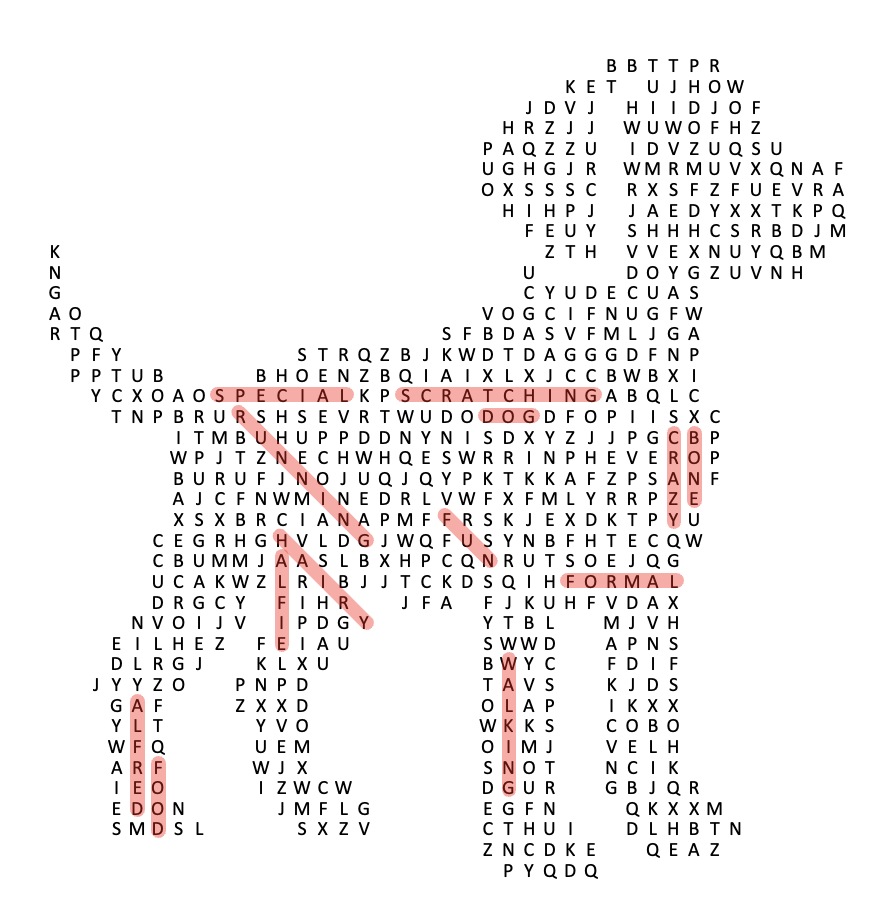
How does it work?
- Go to the “Layouts” section in the Word Search Creator app
- Click on “Create New Layout”
- Decide how big your grid should be. Larger dimensions give you more detail in the shape, but also make the puzzle harder to solve — so think about who will be solving it
- Upload a black and white image. Black areas are where the letters will appear, white areas stay blank
- Click save. You can now pick this layout for any new word search you create (Wordsearches -> Create -> pick your layout under Layouts)
The app converts your image into a custom word search grid.
A few tips
- Make sure your black and white image has clear boundaries between the black and white areas
- Keep most of the black areas connected — the puzzle is more fun to solve that way
- Try a few different grid dimensions to see what works best for your image
FAQ
What file formats work best? PNG files usually give the cleanest results, but JPG works too. Just make sure there is good contrast between the black and white areas.
How do I decide on the dimensions? Think about who will be solving the puzzle. For younger students, keep the dimensions small. For older students or adults, you can go bigger for more detail and challenge.
Can I edit my shape after uploading? Yes. You can tweak the layout in the editor after you upload it.
Any tips for first-timers? Start with a simple, recognizable silhouette — a heart or a star — before trying more complex images.
Will this work with all word lists? Most word lists work fine. Shapes with more black space fit more (and longer) words, so you may need to adjust your list to fit your shape.
Your commercial license covers these too — you can use custom-shaped word searches in all the products you sell.
I’d love to see what you create with it! Send me an e-mail if you make something fun (or if you have any questions).